...
Please contact TCIA’s Help Desk (+1 385-275-8242, voice or text ) or send us an email (help@cancerimagingarchive.net).
6. How do I submit feedback to TCIA website?
...
1. Do I need a user account to access TCIA?
Not unless you need to access private collections, or use shared listsusually. Just search for images without entering login information.
...
3. How do I obtain a TCIA user ID and password?
From Radiology Portal, click  and then click New account. Remember that you do NOT need a user ID and password unless you need to access private collectionsfor most TCIA activities. Just search for images without entering login information.
4. What if I have issues pertaining to my TCIA user ID or password?
Assuming that you already have an account, from Radiology Portal, click and then click .
.
Choose the most appropriate of the following four options:
- You have an account but have forgotten your username.
- You have an account but have forgotten your password.
- You know your username and password, and would like to change your password.
- You would like to update your contact information in our system.
If you are still having trouble accessing your account, please Please contact the TCIA Support Center at help@cancerimagingarchive.net or call or text +1.385.275-8242 (+1.385.ASK-TCIA) during business hours for assistance.
...
2. How do I request access to a restricted collection?
To access a restricted collection, you can gain approval by calling or texting the Help Desk at +1 385-275-8242 (+1 385 ASK-TCIA), or send an email to help@cancerimagingarchive.netYou can contact TCIA Support. Please indicate the name of the restricted collection. You may be directed to follow instructions at NIH-Controlled-Data-Access-Policy .
3. How do I determine the status of a collection that has been submitted?
...
4. Is a listing of all of the modality abbreviations available?
Yes, modality abbreviations are listed here.
Questions about Searching for Images
...
- Log into TCIA.
- To download all of the MRI prostate images, from the Simple Search filters, select MR under Image Modality and select prostate and select PROSTATE under Anatomical Site. The Summary tab shows updated pie charts and the number of image series in the search results.
- Click the Search Results tab.
- Click a Subject ID link to open all series associated with that subject.
Click the cart icon for one or more series. If you select only some of the series, the cart turns yellow. If you select all of the series, the cart turns green. The number of image series in your cart also appears next to the cart.
The cart itself, in the upper-right of the window, shows how many image series are in it and how large the download will be.

Click
 .
.
A message appears reminding you to download the NBIA Data Retriever. If you have already downloaded it, click Do not show this message again and click. Otherwise, click  to go to a page with links for downloads for each operating system.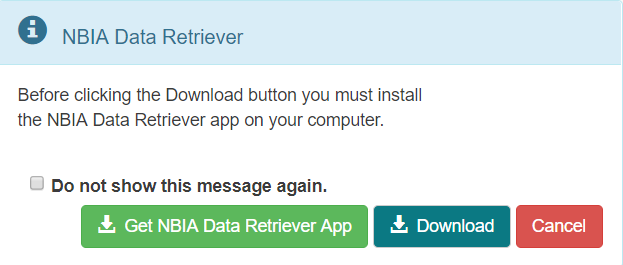
- Open the
manifest-xxx.tciafile in the NBIA Data Retriever. For more information on the NBIA Data Retriever, see NBIA Data Retriever FAQ. Also see question #1 in the previous section.
...
Questions about the TCGA-related imaging data
How do I find additional information about brain tumors?
Please refer to The Cancer Genome Atlas-Glioblastoma Multiforme (TCGA-GBM) collection for well-documented brain-tumor images as described here: https://wiki.cancerimagingarchive.net/display/Public/TCGA-GBM. (This wiki page also links to pages describing related research activities and related resources.)
In the Related Data section, there is a link to a blank GBM Case Quality Control Form that details the kinds and descriptions of clinical data collected. The data are freely available from the TCGA Data Portal: https://tcga-data.nci.nih.gov/tcga.
Once there, click on the link to GBM data. Since TCIA does not host the TCGA Data Portal, we do not offer guidance for browsing the Data Portal.
The TCGA-Lower Grade Glioma (LGG) collection is another set of brain tumor images: TCGA-LGG.
For an overview, see CIP TCGA Radiology Initiative .
Questions about Tumors
Do the exams in TCIA show both malignant and benign tumors?
All patients who are part of TCIA at this time are cancer-positive by definition. We have no collections of non-malignant tumors or healthy patients. The only exception would be patients with multiple tumors who might have a benign tumor in addition to a malignant tumor, but at least one tumor will be malignant in each patientPlease read the Collection descriptions / summaries for a sense of the cohort contained within a particular Collection. Some Collections contain screening trials (a mixture of non-cancer, benign, and malignant may be present) like LIDC-IDRI or NLST. Other Collections focus on metastatic disease. A few TCIA Collections were created as publicly available COVID-19 datasets, unrelated to cancer. Several Analysis Results datasets are available, highlighting different parts of tumors like GTV, necrosis, etc.
Questions about Limited Access Collections
Our page NIH Controlled Data Access Policy describes both the changes TCIA has undergone since April 2025, and new instructions for requesting access.
Useful References
MRI Basic Science and Abbreviations
...
The site gives me problems, and error windows have popped up while I am trying to search or download images.
...